The document platform you actually own.
Storing, serving, editing, collaborating on, automating and reasoning over your documents and models. Reachable over gRPC, REST, WebDAV and MCP, with search, review, in-browser editing and markup, folder automation, and AI that respects every access rule you set.
Join the interest list
This is a production pilot, and we say so up front.
Proxima File Vault is opening as a founding-backer pilot. That means a real, supported, backed-up service that is still hardening. You would be an early participant, not a late customer.
We would rather tell you that now than dress it up. If you want a finished, hands-off product, wait for general availability and we will gladly let you know when it arrives. If you want in early, at founding pricing, with a direct line to the people building it, read on.
We run our own business on it. Proxima File Vault holds our real documents, and we point our own AI agents at that corpus daily. Everything on this page is something we use before we ask you to.
None of this gates the open-source project. FileEngine is here today, self-hostable, and free, whatever happens with the pilot.
What it is
Not another cloud drive
A governed document and model backend built for work that matters, with access control, versioning, conversion, full-text and vector search, in-browser editing, review, automation, and private AI, without stitching a dozen services together.
FileEngine is the open-source platform, free to self-host forever. Proxima File Vault is the hosted service for FileEngine, and it is what we are launching now. The same software either way; what differs is who runs it.
Get FileEngineNothing is lost by accident
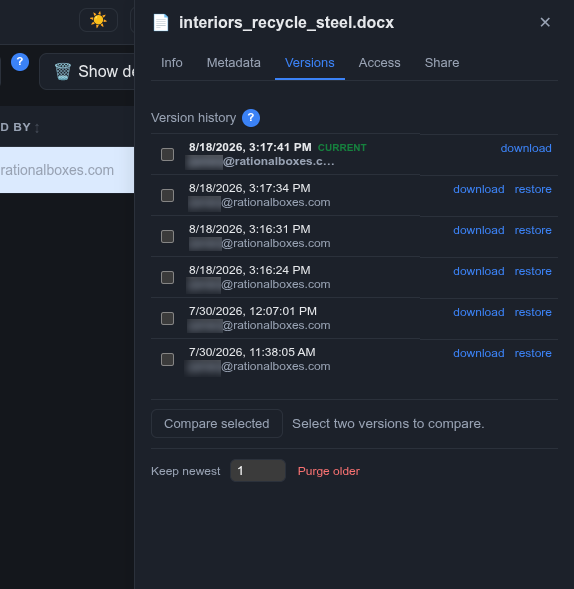
Every change is a new immutable version; the filesystem can be restored to any prior state. Mistakes, human or AI, are always reversible.
This holds whichever door the write comes through. Mount the store as a network drive over WebDAV and save over a file from your file manager, or let an agent write through MCP: the overwrite lands as a new version rather than replacing what was there. What would be a final, unrecoverable save on an ordinary drive is just another entry in the history.
And when law or contract requires the opposite, authorized, audited permanent erasure is available too, so you get both: work that cannot be lost casually, and data you can truly destroy when you must.
Work in the browser
Edit and co-edit Office documents inline with a bundled ONLYOFFICE server, annotate PDFs with the embedded PDF.js editor, and view and mark up 3D, BIM and CAD models with Xeokit.
All without downloading a thing or installing a native app on every machine.
AI over your own documents
Retrieval-augmented chat and semantic search across your files, scoped per user so a chat answer never leaks a file the user cannot open, and scopable to a chosen folder or subtree to focus retrieval.
Ask questions, pull structured data out of technical PDFs, and have the assistant write its findings back as an editable Word document filed wherever you choose. Its citations travel with it as real links, so a finished report is a document you can click through: open a citation, land on the exact source in the store.
Bring your own model, use any OpenAI-compatible endpoint, or run fully local with Ollama.
The AI runs on your data, on your infrastructure, not someone else's cloud.
Point your own AI at it
The research chat is one way in. The other is your own agent.
FileEngine speaks MCP, so Claude, or any MCP client, can work against your documents directly: search the corpus and get ranked results, read documents and versions, trigger extraction, read and post comments, and generate canonical links back to any file.
It searches rather than gropes. An agent issues a real query against the same search the web interface uses and gets ranked hits, filtered at query time to exactly what its identity may see. No listing folders and opening files hoping for a match.
Your documents mostly stay put. For text research the agent reads the indexed text the platform already extracted, so nothing is transferred and nothing is parsed twice. An original file is fetched only when the non-textual content is the point, a drawing's geometry or a scanned layout, and that fetch is permission-checked and logged like any other access.
Because the agent can generate the same links the interface produces, its answers cite sources you can click straight through to.
See what actually changed between versions
Version history tells you that a file changed; FileEngine shows you what.
3D and CAD models compare in the viewer, by identity where the format carries one, separating a real geometry change from a property-only edit. Documents and drawings compare page by page with color-coded differences, object-level where the content supports it, so a moved line reports as moved rather than as a deletion plus an addition.
A comparison is not just a view. A comment on a 2D difference returns you to the exact change, and a comment on a 3D difference becomes a full BCF coordination issue, anchored durably to the real file.
Automation that files itself
Bind actions to any folder that fire on file activity: auto-sort an incoming file by a content classifier so a folder becomes a drop-box inbox, auto-raise a review to the right person, move on approval or rejection, notify a user or role, or call a webhook with a response contract that drives the platform back.
Actions chain across folders into multi-step, review-gated workflows, configured with no code. Your process, running itself.
Review and coordination, not just comments
Comments live on files and specific versions with review semantics, not chat: threads, mentions, review requests, and open or resolved states that link to the version that addressed them.
Review requests are tracked work items with a requester, an assignee, and an approve or reject outcome that the automation layer acts on. It is a durable coordination surface closer to an issue tracker than a comment box.
One governed core, reachable many ways: a web interface, an API, WebDAV, and modern AI protocols. You are never locked to one way in.
Your documents. Your models. Your AI. Your infrastructure.
Most document platforms want your files in their cloud. Most AI document tools want to send your documents somewhere you cannot see. This is the opposite by design.
Open at the core
FileEngine is open source (AGPL) and genuinely self-hostable, and the embedding components are MIT, so you can build them into a commercial product without copyleft reaching it. If you ever outgrow the hosted service you can run FileEngine yourself, and we will help you export. That is a promise the license keeps for you, not a favor we grant.
Permission-gated everything
POSIX-style ACLs, read-by-default with parent traversal. Search and AI results are filtered to exactly what the requesting user may see, enforced at query time.
Accountable by construction
A durable, tamper-evident, hash-chained audit log records who did what, when, and through which door. Governance is in the base product, never a security upsell.
Private AI
The newest document AI, including vision-based understanding of complex layouts and drawings, runs on hardware you control. The AI comes to your documents rather than your documents going to it. Private by architecture, not by policy.
Run it your way
Same platform, your choice of how much you run yourself
Start on the managed shared service. Move to a dedicated, isolated instance when your data governance needs it. Or run a fast local instance in your office for LAN-speed access to large models and let us sync and back it up to the cloud. Or self-host the whole stack.
Dedicated, enterprise and hybrid options roll out after the pilot phase.
No lock-in, ever. Documented open-format export, any time. Content lives in your own S3-compatible bucket, encrypted at rest. You hold the keys, literally.
Compliance built in
Regulated, privacy-conscious and enterprise teams cannot adopt a document system that fails their obligations. Immutability, comprehensive audit and authorized erasure are the three legs of a defensible compliance posture, and all three ship in the base product.
Immutable by default
Nothing lost by accident
Every version retained, restorable to any prior state, so nothing is lost by accident or by a bad actor.
Authorized true erasure
The audited exception
When law or contract requires data to be permanently destroyed, genuine irreversible removal sits behind a permission above the standard administrator level, so it cannot be reached casually. The content is destroyed, but the fact of removal (who, when, under what authority) persists in the audit record, so erasure is provable after the fact.
Accountable end to end
Every door, one record
Every security-relevant action, across every door, streamed to the tamper-evident per-tenant audit log. Every AI-authored report carries a reviewable provenance trail of how it was produced.
Who it is for
If your work is too sensitive, too regulated, or simply too important to rent, this was built for you.
- Design and construction teams coordinating drawings, models, submittals and product data across a project, tired of losing track of which version is current.
- Sustainability and compliance specialists managing certifications, product documentation and audit-ready records where provenance matters.
- Manufacturers and engineering teams collaborating on CAD and CAM models, where revision control is the difference between the right part and scrap.
- Software teams embedding a permissioned file store, review and RAG chat into their own commercial product, with MIT-licensed components that leave it theirs, or giving their AI agents governed access to a document corpus.
- Any document-heavy practice that wants private AI over its own files without shipping them to a third party.
The research behind FileEngine
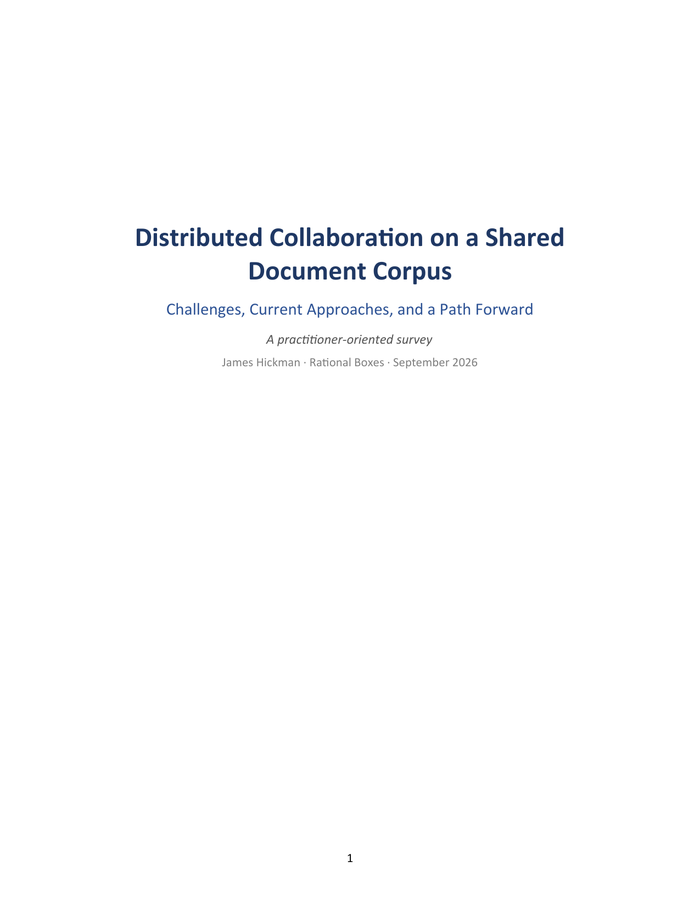
Distributed Collaboration on a Shared Document Corpus
Challenges, Current Approaches, and a Path Forward
Before we wrote any code, we wrote up the problem.
This survey reads the last fifteen years of collaboration software as evidence: the retirement of Google Wave and of Workplace from Meta, the sustained criticism of real-time chat, and the aggregated complaint records of every major file-storage platform. Read together they show two families of tool failing toward each other. Conversation tools capture how decisions get made but cannot preserve them. Storage tools preserve content durably but cannot govern or retrieve it. Neither owns the middle ground, and that middle ground is where FileEngine was built.
It is vendor-neutral for most of its length, and where it turns to FileEngine it says plainly what the project has not yet earned the right to claim.
- Eight failure modes, each with sources: permission entropy, retrieval failure, the physics of large files, the interruption economy, vendor mortality and vendor gravity, AI leakage over shared corpora, and the accountability gap.
- A fair survey of what today's tools genuinely do well: chat platforms, the suites, Box and Dropbox, hybrid file fabrics, self-hosted platforms, and the open protocol layer.
- Ten vendor-neutral design principles distilled from that evidence, written to be used as a checklist against any platform you are evaluating, this one included.
- Where FileEngine stands against that checklist, with the author's interest disclosed, including what it does not yet claim.
- A full bibliography, links verified September 2026.
No spam, no selling your address, an unsubscribe link in every email.
Founding backers get founding terms.
We are funding the pilot through a small, capped founding-backer round. The cap is real: hosting this properly costs money per organization, so we are only taking a cohort we can support hands-on.
The number of founding seats is limited. We will say exactly how many when the round opens.
- Lifetime founder pricing. A discount locked to your account that survives future price rises, for as long as you stay subscribed, applied to whichever service tier you land on.
- A direct line to the team. Office hours, roadmap input and priority pilot support from the people building it.
- A migration guarantee. If you ever choose to self-host instead, we help you move cleanly. No hostages.
Two ways in
Stay in the loop, or put your organization forward for the founding round
Be first in line
Early access and founding-backer pricing. We will keep you posted as the pilot opens.
No spam, no selling your address, an unsubscribe link in every email.
Ask to be considered
Ask to be considered now, and you will be first to hear when the round opens.
Asking to be considered commits you to nothing. We will tell you the terms before you decide.
The full platform, in brief
Everything above rests on FileEngine, a deep, already-built open-source platform
- Fast core. A modern C++17 core with asynchronous I/O; writes return the instant they hit fast local storage while cloud backup happens in the background. Active files cached on local disk, everything else in your S3 store.
- AI research over your own docs. Permission-filtered RAG chat and semantic search, folder-scopable, multi-step research with inline citations that are clickable links to sources the user can actually open, findings saved back as an editable DOCX that carries those links with it.
- Anchored review and discussion. Comments on files and versions with review semantics, mentions, review requests, open and resolved states, all permission-gated and retrievable by the AI as context.
- Edit and mark up in the browser. ONLYOFFICE for Office documents, PDF.js for PDFs, Xeokit for 3D, BIM and CAD; every markup saved as an immutable version.
- Version differencing. Background-precomputed, color-coded, page-by-page 2D diff and identity-aware 3D and CAD model diff, integrated with the coordination surface.
- Folder automation. Event-triggered per-folder actions that chain across folders into review-gated workflows, plug-in extensible.
- CAD, BIM and 3D in the browser. IFC, glTF/GLB, CityJSON, LAS/LAZ, STL and PLY get an interactive rendition plus metadata extraction feeding full-text and vector search.
- openBIM issue hub (BCF). Raise issues anchored to elements and viewpoints, export and import BCF through a standards-based REST API that round-trips to Revit and other authoring tools.
- Embedding kit. An MIT-licensed set of standalone web components that drop into any product, in any framework or none, authenticating per user with no data proxy. The license carries no copyleft obligation, so a commercial product can embed them freely.
- Programmatic provisioning. A server-to-server API that stands up standardized workspaces from a JSON blueprint, so an integrator can construct per-customer workspaces from a template.
- Secure external sharing. Send a file, a folder as a zip, or an upload drop-box, every link bounded by recipient allow-list, emailed one-time code, expiry, use caps and instant revocation.
- Multi-tenant with self-service administration. Per-tenant subdomains, isolated schemas, directory-backed users and roles, tenant admin console, self-service profile and password management.
- Sign in with what you already use. OAuth 2.0 and OIDC alongside the directory, on a single reserved sign-in origin, with per-tenant two-factor.
- Your data, your bucket. Content in any S3-compatible store, encrypted and compressed at rest.
- Many doors, one core. One permissioned gRPC core exposed through REST, WebDAV and a bidirectional MCP server that gives an external agent permission-filtered corpus search, versioned reads and canonical source links, with every outbound call admin-gated, permission-scoped and audited.
The hard part, solved: AI that cannot see what the user cannot
Most "chat with your documents" tools index everything and hope.
FileEngine indexes everything once, then re-checks permissions for every retrieved passage as the end user, so a chat answer never leaks a file the user is not allowed to open. Index-time: complete coverage. Query-time: per-user ACL enforcement on every result. Citations link back only to sources the user can actually open. Add or revoke a rule and visibility changes immediately.
Local speed, cloud durability, or hybrid
Run on-premises for LAN-speed file serving and let it persist to the cloud automatically. Writes land on a fast local server and return immediately while the core synchronizes to your S3 store in the background, with automatic recovery if a node or the link drops.
Deploy fully on-premises, fully in the cloud, or hybrid. For teams working with large CAD, BIM or media files, hybrid is the answer to WAN latency that pure cloud cannot match, and it is a topology a cloud-only competitor cannot offer, because it requires a self-hostable core.